








The result is a plug-and-play experience specifically designed to enhance productivity, reduce engineering overhead, and accelerate development cycles while reducing overall costs.
Optimizing Workflow Execution with “Prod Mode”
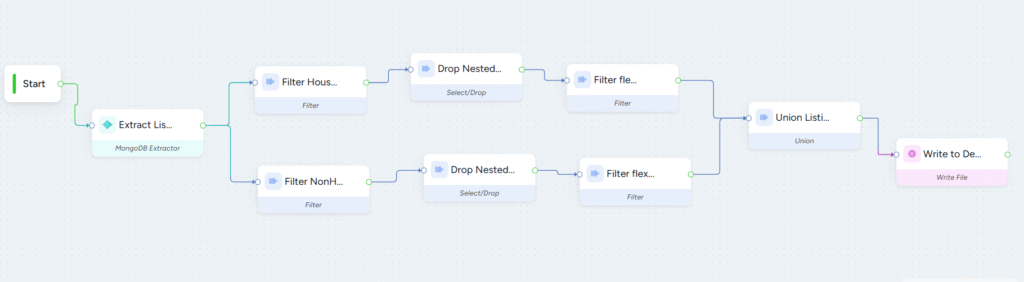
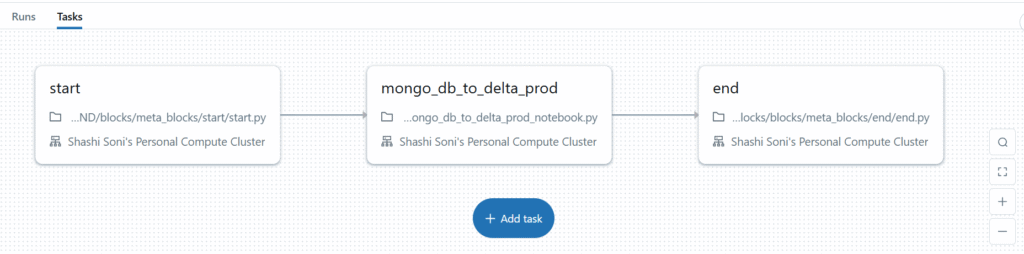
In native Databricks Workflows, data must be written to a central staging layer (like Unity Catalog) to move from one task to another. DataNimbus Designer eliminates this dependency by leveraging Apache Spark’s lazy evaluation through a feature called “Prod Mode.”When a workflow is published in Prod Mode, DataNimbus Designer compacts all tasks into a single Databricks Workflow task. This allows direct data flow between blocks without intermediate writes, significantly reducing execution overhead. The system preserves transformations in Spark’s optimizer until an action is performed—typically at the final write stage of the ETL process. This approach fully utilizes Spark’s lazy evaluation capabilities.
Key Benefits of Prod Mode:
- Removes the need for staging layers
- Fully leverages Spark’s lazy evaluation
- Reduces workflow runtime by up to 50%
Native Databricks Workflow:
Connector Marketplace
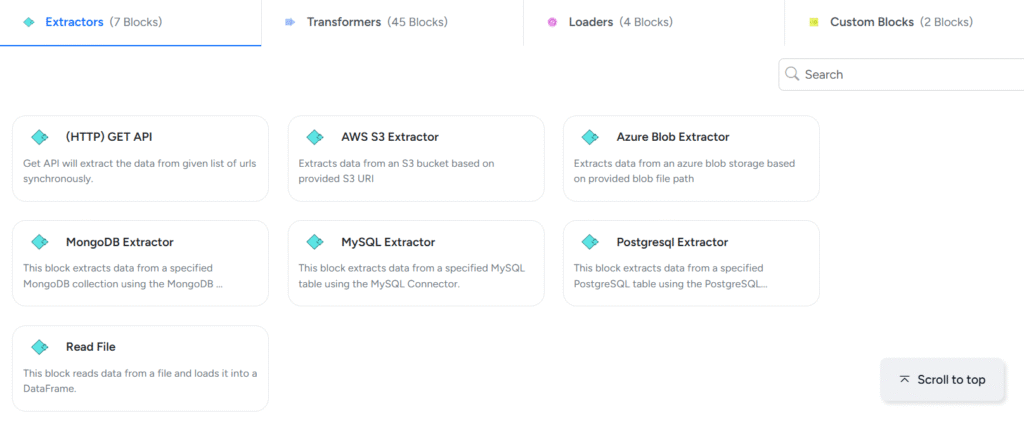
DataNimbus Designer comes with an extensive library of built-in connectors to extract and load data from various data sources. These connectors feature Auto-Discovery capability where you simply point to the data sources and DataNimbus Designer intelligently detects all the underlying databases and tables and loads them into the desired destination tables of your choice. Some of the connectors offered by DataNimbus Designer are:- MongoDB
- Cassandra DB
- AWS Keyspaces
- AWS RDS
- AWS S3
- Apache Solr
- Azure Blob Storage
- PostgreSQL
- MySQL
Reusability of Components Across Pipelines
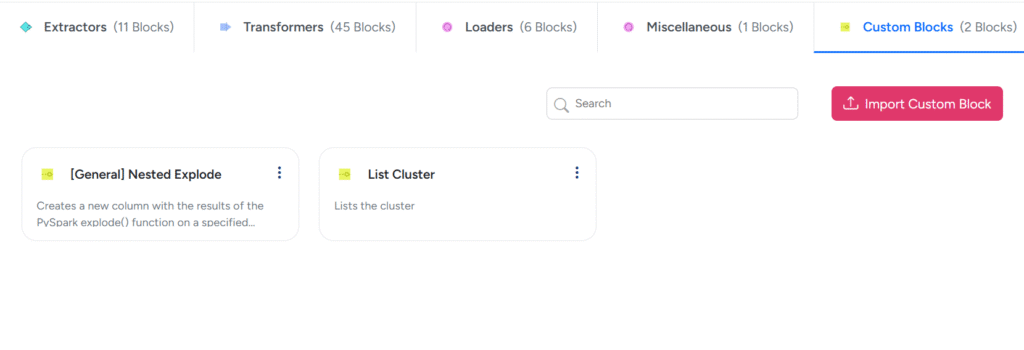
DataNimbus Designer is built for reusability. It comes with a rich library of pre-built Spark connectors and transformation blocks—tested, optimized, and ready to use across multiple pipelines. These blocks can be reused with different parameters, eliminating repetitive coding and reducing development time significantly compared to native Databricks workflows. Each block comes pre-configured with Spark optimization and parameter tuning for optimal performance.Developers can also incorporate custom code for tasks not covered by default. Once added, these custom blocks become reusable components across workflows—promoting consistency and flexibility to build a tailored ETL workload for specific needs.
Custom blocks offer a high degree of flexibility within a workflow, enabling users to plug in their own code to meet specific business needs. Unlike predefined tasks, custom blocks empower users to define completely custom behavior. Whether it’s sending an email, logging a message to a database, or performing more complex operations, users can bring in their own Python code and execute it seamlessly as part of the workflow.
Some common use cases for Custom blocks include:
- Logging a message to a queue
- Sending notifications or alerts via email
- Starting a compute cluster
- Running custom jobs
- Triggering external APIs
Because the logic inside a custom block is written in Python, users benefit from Python’s vast ecosystem of libraries and frameworks. From database connectors and web request handlers to ML tools and system utilities, virtually anything achievable in Python can be embedded directly into the workflow. This makes custom blocks a vital tool for teams looking to operationalize complex logic, integrate legacy systems, or simply inject flexibility into otherwise rigid automation pipelines.
Ultimately, custom blocks act as a powerful extensibility mechanism that gives users complete control, allowing them to handle edge cases, perform advanced transformations, or build deeply integrated data workflows without being constrained by the limitations of standard task types.
Taking it a step further, DataNimbus Designer allows grouping multiple blocks into custom composite blocks. These can then be reused for common patterns, further accelerating pipeline development and promoting standardization.
Here’s a snapshot of custom blocks:
Native Integration with Databricks Notebooks and Jobs
A core strength of DataNimbus Designer is its native integration with Databricks Notebooks and Jobs. Every task built in DataNimbus Designer is automatically converted into a dedicated notebook, enabling a modular and scalable workflow design.These notebooks—whether prebuilt connectors, transformation blocks, or custom code—are deployed as part of a Databricks Job. This seamless deployment ensures that ETL workflows built in DataNimbus Designer run natively on Databricks, with full access to real-time execution, monitoring, and autoscaling.
Databricks Jobs then efficiently orchestrate and schedule these notebook tasks, providing teams a unified method to manage even the most complex pipelines—without losing the benefits of Spark or the flexibility of Databricks.
This integration creates a powerful ecosystem where organizations can leverage the full potential of both platforms—DataNimbus Designer’s visual development and optimization capabilities alongside Databricks’ scalability and performance—ensuring efficient management of data-driven workflows.

This website uses cookies to facilitate and enhance your use of the website and track usage patterns. By continuing to use this website, you agree to our use of cookies as described in our Privacy Policy. ACCEPT